Posts

Showing posts with the label Microsoft Visual Basic

vb converter example

Image
  vb code is:- Private Sub cmdChangeOunceGram_Click()     Call cmdClearOunceGram_Click     If Label5.Caption = "Ounce" Then         Label5.Caption = "Gram"         Label6.Caption = "Ounce"     Else         Label5.Caption = "Ounce"         Label6.Caption = "Gram"     End If End Sub Private Sub cmdClearPoundKilo_Click()     text1.Text = ""     text2.Text = "" End Sub Private Sub cmdChangePoundKilo_Click()     Call cmdClearPoundKilo_Click     If Label1.Caption = "Pound" Then         Label1.Caption = "Kilogram"         Label2.Caption = "Pound"     Else         Label1.Caption = "Pound"         Label2.Caption = "Kilogram"     End If End Sub Private Sub cmdClearCaratGram_Click()     Text3.Text = ""     Text4.Text ...

VB Timer Example

Image
  VB TIMER EXAMPLE VB CODE IS - Private Sub cmdClearPrintMsg_Click()     Cls End Sub Private Sub cmdStartTimer_Click()     Timer1.Enabled = True     Timer1.Interval = Val(txtInterval.Text) End Sub Private Sub cmdStopTimer_Click()     Timer1.Enabled = False End Sub Private Sub cmdClearInterval_Click()     txtInterval.Text = "" End Sub Private Sub cmdClearMsg_Click()     txtMsg.Text = "" End Sub Private Sub Timer1_Timer()     Print txtMsg.Text End Sub

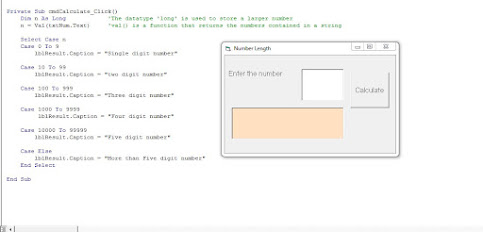
vb Number Length

Image
  NUMBER LENGTH VB CODE IS - Private Sub cmdCalculate_Click()     Dim n As Long     n = Val(txtNum.Text)          Select Case n     Case 0 To 9         lblResult.Caption = "Single digit number"              Case 10 To 99         lblResult.Caption = "two digit number"     Case 100 To 999         lblResult.Caption = "Three digit number"     Case 1000 To 9999          lblResult.Caption = "Four digit number"     Case 10000 To 99999         lblResult.Caption = "Five digit number"     Case Else         lblResult.Caption = "More than Five digit number"     End Select End Sub

VB Move Example

Image
  CODE IS HERE - Private Sub cmdMoveToRight_Click()     Label1.Move 3000 End Sub Private Sub cmdMoveUpwards_Click()     Label2.Move 1200, 1000 End Sub Private Sub cmdReset_Click()     Label1.Left = 1440     Label2.Top = 2040     Label3.Left = 2160     Label3.Top = 3960     Label3.Width = 1935     Label3.Height = 1095 End Sub Private Sub cmdTopRightCorner_Click()     Label3.Move 6500, 240, 1000, 500 End Sub

VB Image Show

Image
 IMAGE SHOW THROUGH VB- VB CODE IS :- Private Sub cmdShow_Click()     Picture1.Picture = LoadPicture("G:\laptop backup jan 2017\visul besic 6\Image Show\Image Show\wea favcon23.JPG") End Sub ----------------------------

VB If Else Statement

Image
VB If Else Statement  CODE IS :- Private Sub Form_Load()     Form1.Show     Dim a As Integer     a = InputBox("Enter the value of a")     If a > 5 Then         Print "The number is greater than 5"     Else         Print "The number is less than 5"     End If End Sub --------------------------

VB Format Text

Image
 FORMAT TEXT :- CODE IS HERE:- Private Sub optBlue_Click()     lblMessage.ForeColor = vbBlue End Sub ----------------------------------------------------------------------- Private Sub optGreen_Click()     lblMessage.ForeColor = vbGreen End Sub ----------------------------------------------------------------------- Private Sub Option1_Click() Label1.ForeColor = vbGreen End Sub ----------------------------------------------------------------------- Private Sub optLarge_Click()     lblMessage.FontSize = 22 End Sub ----------------------------------------------------------------------- Private Sub optMedium_Click()     lblMessage.FontSize = 16 End Sub ----------------------------------------------------------------------- Private Sub optRed_Click()     lblMessage.ForeColor = vbRed End Sub ----------------------------------------------------------------------- Private Sub optSmall_Click()     lblMessage.FontSize = 12 End Sub -...

vb example form design

Image
 FORM DESIGN -  CODE VIEW - Private Sub cmdBlack_Click()     Form1.BackColor = vbBlack              'THIS PROGRAM TEACHES YOU TO SET PROPERTIES IN RUN-TIME                                         'Form1 is the OBJECT, BackColor is the PROPERTY, vbBlack is VALUE End Sub Private Sub cmdChangePosition_Click()     Form1.Top = 5000     Form1.Left = 5000 End Sub Private Sub cmdDefault_Click()     Form1.BackColor = &H8000000F         'This is the Hexa-decimal color code     Form1.Width = 4500     Form1.Height = 4125     Form1.Top = 900                     'You can also set these properties in DESIGN TIME     Form1.Left = 900 End Sub Private Sub cmdEnlarge_Click()     Form1.Width =...

vb example digi clock

Image
 DIGITAL CLOCK    CODE VIEW - Private Sub cmdPause_Click()     Timer1.Enabled = False End Sub Private Sub cmdStart_Click()     Timer1.Enabled = True End Sub Private Sub Timer1_Timer()     txtTime.Text = Time End Sub

vb example color picker from form

Image
 COLOR PICK FROM FORM CODE VIEW - Private Sub Form_MouseDown(Button As Integer, Shift As Integer, X As Single, Y As Single)     If Button = vbRightButton Then         PopupMenu mnuColors     End If End Sub Private Sub mnuBlue_Click()     Form1.BackColor = vbBlue End Sub Private Sub mnuGreen_Click()     Form1.BackColor = vbGreen End Sub Private Sub mnuRed_Click()     Form1.BackColor = vbRed End Sub Private Sub mnuWhite_Click()     Form1.BackColor = vbWhite End Sub Private Sub mnuYellow_Click()     Form1.BackColor = vbYellow End Sub

vb example click count

Image
 CLICK COUNT CODE IS HERE :- Private Sub cmdClick_Click()     Static n As Integer     n = n + 1     Print n End Sub

vb simple program

Image
 VB PROGRAM MICROSOFT VISUAL BASIC write a program to print the multiplication table- Dim I, j As Integer Private Sub command1_click() For I = 1 To 10 For j = 1 To 10 p = I * j Print I; "*"; j; "="; p, Next j Print Next I End Sub Write a program to find the summation of undetermined number of positive numbers such that the program will be stopped when we enter negative  number- Dim x, sum As Single Private Sub command1_click() sum = 0 x = Val(InputBox("enter x", "summation")) Do While x >= 0 sum = sum + x x = Val(InputBox("enter x", "summation ")) Loop MsgBox (CStr(sum)) End Sub